Weather Dashboard by openAPI
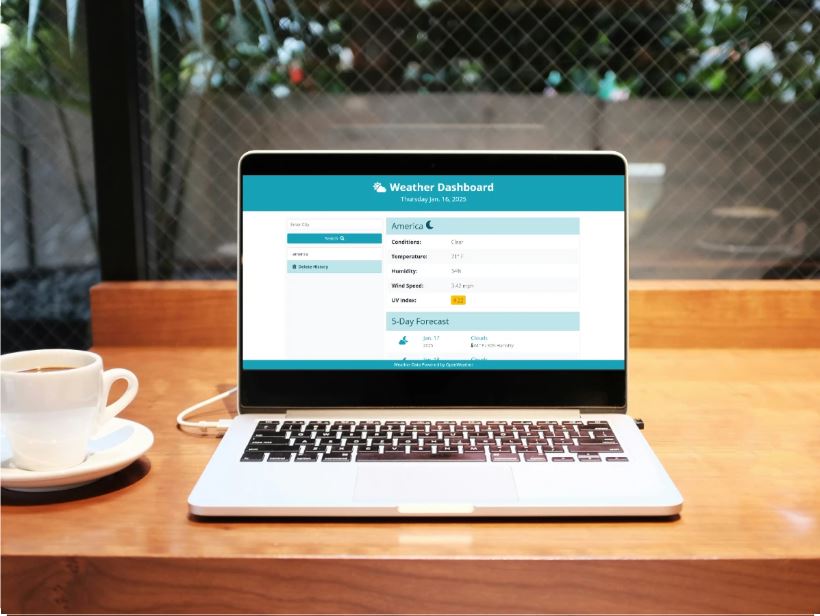
Weatherly is a sleek and responsive weather web application built with HTML, CSS, and JavaScript, powered by the OpenWeatherMap API. Designed for simplicity and usability, Weatherly allows users to check current weather conditions for any city in the world in real time. Whether you're commuting, traveling, or just planning your day, Weatherly provides quick access to essential weather data—including temperature, conditions, humidity, and wind speed—all within a clean and interactive interface.
Services
Product Design, Strategy, Branding, Code Development
Services
Product Design, Strategy, Branding, Code Development
Services
Product Design, Strategy, Branding, Code Development
Tools
Framer, Figma, Adobe CC,VScode,Open API
Tools
Framer, Figma, Adobe CC,VScode,Open API
Tools
Framer, Figma, Adobe CC,VScode,Open API
Value
Highly customizable, high performance
Value
Highly customizable, high performance
Value
Highly customizable, high performance
Timeline
2 weeks
Timeline
2 weeks
Timeline
2 weeks
My Approach
Weatherly is a modern, sleek, and reliable weather web application designed for users who want accurate weather information with zero hassle. Whether you're a casual user checking the day’s forecast or a travel planner needing detailed climate insights, Weatherly provides a seamless and responsive experience through a clean UI and real-time data from the OpenWeatherMap API.
Vision and Innovation
At the heart of Weatherly is a vision to redefine how people access and interact with weather data. We've blended the power of real-time weather APIs with a user-first approach to create a dynamic platform. With live updates, interactive visuals, and optimized performance, Weatherly ensures users stay informed—anytime, anywhere.
Identifying Unique Challenges
Getting accurate and user-friendly weather data shouldn't feel overwhelming. From inconsistent UI designs to slow-loading forecasts, users often struggle with clarity and speed. Weatherly was built to eliminate these barriers—focusing on clarity, responsiveness, and practical utility.
Resolving Complex Problems
Weatherly addresses key weather-tracking needs through carefully integrated features:
Live Weather Data: Pulls real-time weather updates using the OpenWeatherMap API.
City-Based Search: Lets users enter any city to instantly get weather info.
Detailed Forecast: Displays temperature, humidity, weather conditions, and wind speed.
Responsive Design: Works flawlessly across all screen sizes—from phones to desktops.
Error Handling: Provides clear messages if city names are incorrect or data isn’t found.
User-Centric Design
Design and usability are at the core of Weatherly. Every interaction is built to be smooth, intuitive, and visually appealing.
Minimal UI: A clean layout that avoids clutter and enhances readability.
CSS Animations: Light motion effects to enrich user experience without slowing performance.
Dark & Light Modes (Coming Soon): For better accessibility in different lighting environments.
Meeting User Needs
Weatherly caters to a wide range of users:
Everyday Users: Check your daily forecast before heading out.
Commuters & Travelers: Know what to expect when traveling to other cities.
Outdoor Enthusiasts: Plan your hikes, sports, or beach days with accurate insights.
Detailed Pages and Features
Home Page: Real-time input for city weather search.
Weather Dashboard: Live display of temperature, weather condition, humidity, and wind.
Error Display: Friendly messages for invalid inputs or API issues.
Future Updates (optional ideas): 5-day forecast, location-based auto weather, and radar maps.
Accessibility and Optimization
A11y Considerations: High-contrast design and readable fonts for all users.
Performance: Built with lightweight HTML, CSS, and JS for fast load times.
Mobile Optimization: Fully responsive for on-the-go weather checks.
Conclusion
Weatherly is more than just another weather app—it's a smart, simple, and stylish way to stay ahead of the forecast. With real-time data, a smooth interface, and thoughtful features, Weatherly delivers everything users need in a single-page experience. Built using HTML, CSS, JavaScript, and powered by OpenWeatherMap’s API—Weatherly is ready to inform your day, every day.
My Approach
Weatherly is a modern, sleek, and reliable weather web application designed for users who want accurate weather information with zero hassle. Whether you're a casual user checking the day’s forecast or a travel planner needing detailed climate insights, Weatherly provides a seamless and responsive experience through a clean UI and real-time data from the OpenWeatherMap API.
Vision and Innovation
At the heart of Weatherly is a vision to redefine how people access and interact with weather data. We've blended the power of real-time weather APIs with a user-first approach to create a dynamic platform. With live updates, interactive visuals, and optimized performance, Weatherly ensures users stay informed—anytime, anywhere.
Identifying Unique Challenges
Getting accurate and user-friendly weather data shouldn't feel overwhelming. From inconsistent UI designs to slow-loading forecasts, users often struggle with clarity and speed. Weatherly was built to eliminate these barriers—focusing on clarity, responsiveness, and practical utility.
Resolving Complex Problems
Weatherly addresses key weather-tracking needs through carefully integrated features:
Live Weather Data: Pulls real-time weather updates using the OpenWeatherMap API.
City-Based Search: Lets users enter any city to instantly get weather info.
Detailed Forecast: Displays temperature, humidity, weather conditions, and wind speed.
Responsive Design: Works flawlessly across all screen sizes—from phones to desktops.
Error Handling: Provides clear messages if city names are incorrect or data isn’t found.
User-Centric Design
Design and usability are at the core of Weatherly. Every interaction is built to be smooth, intuitive, and visually appealing.
Minimal UI: A clean layout that avoids clutter and enhances readability.
CSS Animations: Light motion effects to enrich user experience without slowing performance.
Dark & Light Modes (Coming Soon): For better accessibility in different lighting environments.
Meeting User Needs
Weatherly caters to a wide range of users:
Everyday Users: Check your daily forecast before heading out.
Commuters & Travelers: Know what to expect when traveling to other cities.
Outdoor Enthusiasts: Plan your hikes, sports, or beach days with accurate insights.
Detailed Pages and Features
Home Page: Real-time input for city weather search.
Weather Dashboard: Live display of temperature, weather condition, humidity, and wind.
Error Display: Friendly messages for invalid inputs or API issues.
Future Updates (optional ideas): 5-day forecast, location-based auto weather, and radar maps.
Accessibility and Optimization
A11y Considerations: High-contrast design and readable fonts for all users.
Performance: Built with lightweight HTML, CSS, and JS for fast load times.
Mobile Optimization: Fully responsive for on-the-go weather checks.
Conclusion
Weatherly is more than just another weather app—it's a smart, simple, and stylish way to stay ahead of the forecast. With real-time data, a smooth interface, and thoughtful features, Weatherly delivers everything users need in a single-page experience. Built using HTML, CSS, JavaScript, and powered by OpenWeatherMap’s API—Weatherly is ready to inform your day, every day.
My Approach
Weatherly is a modern, sleek, and reliable weather web application designed for users who want accurate weather information with zero hassle. Whether you're a casual user checking the day’s forecast or a travel planner needing detailed climate insights, Weatherly provides a seamless and responsive experience through a clean UI and real-time data from the OpenWeatherMap API.
Vision and Innovation
At the heart of Weatherly is a vision to redefine how people access and interact with weather data. We've blended the power of real-time weather APIs with a user-first approach to create a dynamic platform. With live updates, interactive visuals, and optimized performance, Weatherly ensures users stay informed—anytime, anywhere.
Identifying Unique Challenges
Getting accurate and user-friendly weather data shouldn't feel overwhelming. From inconsistent UI designs to slow-loading forecasts, users often struggle with clarity and speed. Weatherly was built to eliminate these barriers—focusing on clarity, responsiveness, and practical utility.
Resolving Complex Problems
Weatherly addresses key weather-tracking needs through carefully integrated features:
Live Weather Data: Pulls real-time weather updates using the OpenWeatherMap API.
City-Based Search: Lets users enter any city to instantly get weather info.
Detailed Forecast: Displays temperature, humidity, weather conditions, and wind speed.
Responsive Design: Works flawlessly across all screen sizes—from phones to desktops.
Error Handling: Provides clear messages if city names are incorrect or data isn’t found.
User-Centric Design
Design and usability are at the core of Weatherly. Every interaction is built to be smooth, intuitive, and visually appealing.
Minimal UI: A clean layout that avoids clutter and enhances readability.
CSS Animations: Light motion effects to enrich user experience without slowing performance.
Dark & Light Modes (Coming Soon): For better accessibility in different lighting environments.
Meeting User Needs
Weatherly caters to a wide range of users:
Everyday Users: Check your daily forecast before heading out.
Commuters & Travelers: Know what to expect when traveling to other cities.
Outdoor Enthusiasts: Plan your hikes, sports, or beach days with accurate insights.
Detailed Pages and Features
Home Page: Real-time input for city weather search.
Weather Dashboard: Live display of temperature, weather condition, humidity, and wind.
Error Display: Friendly messages for invalid inputs or API issues.
Future Updates (optional ideas): 5-day forecast, location-based auto weather, and radar maps.
Accessibility and Optimization
A11y Considerations: High-contrast design and readable fonts for all users.
Performance: Built with lightweight HTML, CSS, and JS for fast load times.
Mobile Optimization: Fully responsive for on-the-go weather checks.
Conclusion
Weatherly is more than just another weather app—it's a smart, simple, and stylish way to stay ahead of the forecast. With real-time data, a smooth interface, and thoughtful features, Weatherly delivers everything users need in a single-page experience. Built using HTML, CSS, JavaScript, and powered by OpenWeatherMap’s API—Weatherly is ready to inform your day, every day.
Projects
Other Projects
Other Projects


Reach out anytime
Let’s Stay Connected
Got questions or want to collaborate? Feel free to reach out—I'm open to new projects or just a casual chat!
Reach out anytime
Let’s Stay Connected
Got questions or want to collaborate? Feel free to reach out—I'm open to new projects or just a casual chat!
Reach out anytime
Let’s Stay Connected
Got questions or want to collaborate? Feel free to reach out—I'm open to new projects or just a casual chat!